
JAVA 쇼핑몰 제작 01
2023. 2. 2. 18:26ㆍJAVA
제작 방향
- 관리자 페이지
-관리자 로그인 (인증 (Authorization))
-카테고리 리스트
-카테고리 삭제
-상품등록,수정,삭제,리스트
-회원등록,수정,삭제,리스트
- 오라클 DB 사용
-어드민 테이블
-카테고리 테이블
-상품관련테이블
-상품번호 (시퀀스 : prod_seq)
-상품명, 상품카테고리, 상품회사 , 상품이미지, 상품수량 , 상품가격 상품사양(추천,인기…)상품설명 , 포인트 , 상품입고날짜
-카테고리관련 상품등록
-상품리스트
-상품정보수정
-상품삭제
SQL 작성
--------------admin -------------
drop table tbl_admin;
create table tbl_admin(
    id varchar2(20) not null,
    password varchar2(20) not null,
    name varchar2(20) not null,
    email varchar2(50) not null
);

select * from tbl_admin;
INSERT INTO tbl_admin values('admin','1234','관리자','admin@gmail.com');
commit;

---------------category---------------
drop table category;
create table category(
    cate_num number(5) primary key,
    code varchar2(10) not null,
    cate_name varchar2(20) not null
);

drop sequence cate_seq;
create sequence cate_seq;
-------product ------------
--상품번호, 상품명, 상품카테고리,상품제조사,상품이미지,수량,가격
--상품사양 (인기 , 추천 , 신규상품 등등)
drop table tbl_product;
create table tbl_product(
    pNum number(10) primary key,
    pName varchar2(50) not null,
    pCategory_fk varchar2(30) not null,
    pCompany varchar2(50),
    pImage varchar2(50),
    pQty number(5) default 0,
    price number(10) default 0,
    pSpec varchar2(20),
    pContent varchar2(300),
    pPoint number(8) default 0,
    pInputDate date
);


drop sequence prod_seq;
create sequence prod_seq;

------------shop_member---------------
drop table shop_member;
create table shop_member(
    id varchar2(20) not null,
    pw varchar2(20) not null,
    name varchar2(20) not null,
    tel varchar2(20) not null,
    email varchar2(20) not null,
    addr varchar2(20) not null,
    rdate timestamp not null
);
패키지 생성

cotnext.xml,web.xml,ojdbc6.jar 파일 추가
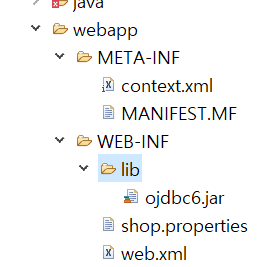
FrontController 추가
package ez.web.frontController;

import java.io.FileReader;
import java.io.IOException;
import java.util.HashMap;
import java.util.Iterator;
import java.util.Properties;

import javax.servlet.RequestDispatcher;
import javax.servlet.ServletException;
import javax.servlet.http.HttpServlet;
import javax.servlet.http.HttpServletRequest;
import javax.servlet.http.HttpServletResponse;

import ez.web.command.ShopCommand;


//@WebServlet("*.do")
public class FrontController extends HttpServlet {
	private HashMap<String , ShopCommand> commandMap = new HashMap<String, ShopCommand>();

	public void init() throws ServletException {
		//configFile = /WEB-INF/shop.properties
		String configFile = getInitParameter("configFile");

		//서버의 물리경로(실제경로) 얻어오기
		String configPath = getServletContext().getRealPath(configFile);

		Properties prop = new Properties();

		try {
			FileReader fis = new FileReader(configPath);
			prop.load(fis);
		}catch(Exception e) {
			e.printStackTrace();
		}

		Iterator keyIter = prop.keySet().iterator();

		while(keyIter.hasNext()) {
			String command = (String)keyIter.next(); //키 가져오기
			String cmdValue = prop.getProperty(command);//키 해당값 가져오기
			try {
				Class<?> cmdClass = Class.forName(cmdValue);
				//인스턴스 생성
//				ShopCommand cmdInstance = (ShopCommand)cmdClass.newInstance();
				ShopCommand cmdInstance = (ShopCommand)cmdClass.getDeclaredConstructor().newInstance();

				commandMap.put(command, cmdInstance);


			} catch (Exception e) {
				// TODO Auto-generated catch block
				e.printStackTrace();
			}
		}
	}

	protected void service(HttpServletRequest request, HttpServletResponse response) throws ServletException, IOException {
		request.setCharacterEncoding("utf-8");

		String uri = request.getRequestURI();
		String ctxPath = request.getContextPath();
		String cmd = uri.substring(ctxPath.length());
		System.out.println("cmd : " + cmd);

		ShopCommand cmdInstance = commandMap.get(cmd);

		String viewPage = null;
		viewPage = cmdInstance.execute(request, response);


		RequestDispatcher rd = null;
//		if(viewPage.indexOf(".do") != -1) { // ".do"문자열이 포함되어 있으면
//			rd = request.getRequestDispatcher(viewPage);
//		}else {
//			rd =request.getRequestDispatcher("WEB-INF/board/"+viewPage+".jsp");
//		}
		if(viewPage != null ) {
			rd = request.getRequestDispatcher(viewPage);
			rd.forward(request, response);
		}

		rd.forward(request, response);
	}

}
ShopCommand 추가
package ez.web.command;
import java.io.IOException;
import javax.servlet.ServletException;
import javax.servlet.http.HttpServletRequest;
import javax.servlet.http.HttpServletResponse;
public interface ShopCommand {
String execute(HttpServletRequest request , HttpServletResponse response) throws ServletException, IOException;
}
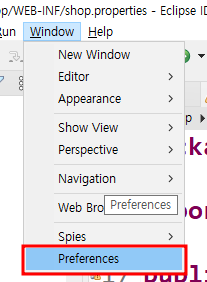
Properties 파일 한글설정 하기
'JAVA' 카테고리의 다른 글
| context.xml MYSQL , ORACLE (0) | 2023.01.27 |
|---|---|
| 자바 Mysql 1) 회원가입 로직 (0) | 2023.01.26 |
| 기초 - 자바 회원가입 로직 2장 (0) | 2023.01.18 |
| 기초 - 자바 회원가입 로직 1장 (0) | 2023.01.17 |
| 개발환경구축 - jdk 11 설치 (0) | 2023.01.17 |